

A beautiful shot can be almost worthless as stock footage if an editor cannot legally license it, easily discover it, or cut it into a project.
That is the first thing I would remember when learning how to build a stock video portfolio. Stock footage is not simply a collection of your most cinematic moments. It is an inventory of useful visual assets created for advertisers, publishers, filmmakers, agencies, social teams, and corporate editors who need footage that solves a specific production problem.
The strongest portfolios therefore combine three things: technically dependable files, commercially useful subjects, and clean licensing documentation.
Start With Buyer Utility, Not a Camera Shopping List
You do not need to begin with an expensive cinema camera. You need footage that looks intentional and survives professional editing.
Adobe Stock currently accepts footage from five to 60 seconds and supports common frame rates including 23.98, 24, 25, 29.97, 30, 50, 59.94, and 60 fps. Its accepted formats include MOV, MPG, and MP4, with ProRes and H.264 among its recommended codecs.
Shutterstock similarly accepts clips between five and 60 seconds and supports HD, 2K, and several 4K resolutions. It also accepts both horizontal and vertical footage.
Those specifications provide a useful baseline, but technical acceptance should not be confused with commercial quality.
Aim for Clean, Flexible Footage
For most new work, I would shoot 4K whenever practical. Higher resolution gives customers greater cropping and reframing freedom and keeps the footage useful across more delivery formats.
Watch especially for:
- accidental camera shake
- clipped highlights
- crushed shadows
- visible sensor noise
- aggressive sharpening
- flickering artificial lights
- incorrect white balance
- compression artifacts
- unwanted rolling-shutter distortion
Shutterstock specifically evaluates submissions for issues including focus, exposure, noise, artifacts, stabilization, and frame-rate problems.
Do not add cinematic black bars, titles, transitions, watermarks, or elaborate grading that limits what another editor can do.
Build Shoots Around Concepts People Need
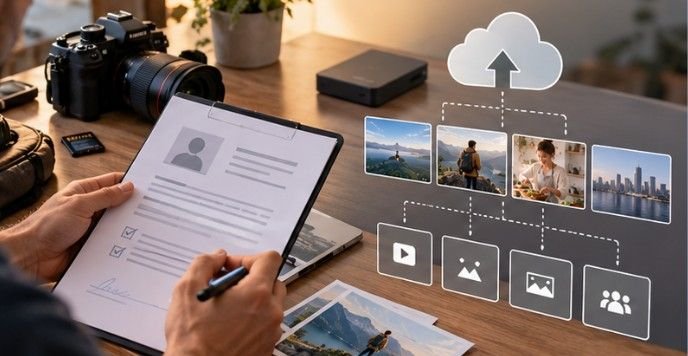
One mistake beginners make is photographing whatever happens to look interesting: a sunset today, coffee tomorrow, a dog next week, then three random drone clips. That creates footage. It does not necessarily create a portfolio. Instead, organize shoots around commercial concepts.
A home-office session, for example, can communicate remote work, productivity, entrepreneurship, digital communication, stress, flexible employment, online learning, or work-life balance.
A kitchen shoot might cover meal preparation, healthy eating, family routines, food delivery, budgeting, sustainability, and household chores.
This approach also fits naturally with building a recognizable creative identity. If you eventually want clients to associate you with a specific look or subject area, developing a clear personal brand as a content creator can make the portfolio more coherent.
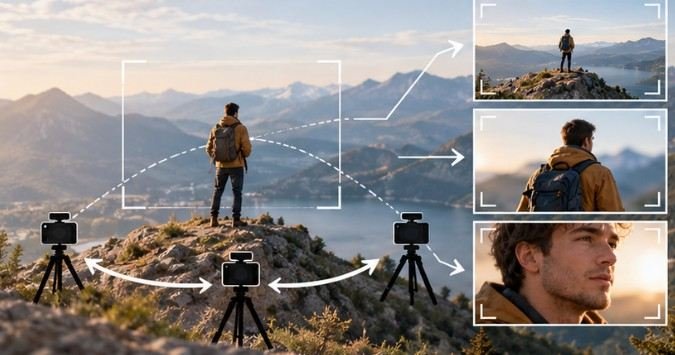
Use the Wide-Medium-Close System
One location should rarely produce only one clip. Suppose you are filming a freelance designer working from home. Capture:
Wide Shot
Show the person within the room. This establishes environment and gives editors room for titles or graphics.
Medium Shot
Frame the person using the laptop or interacting with something on the desk.
Close-Up
Film typing hands, a mouse, facial expressions, a coffee mug, notebook pages, or other details. Then vary the action.
Have the subject arrive, work, pause, stretch, join a call, take notes, look frustrated, smile, and leave the desk.
One properly planned scene can therefore produce numerous distinct assets without resorting to near-duplicate uploads.
Create Content Before Demand Peaks
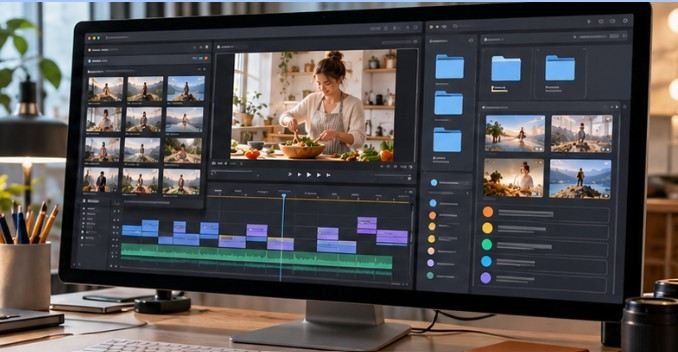
Stock footage has a production lag. You must shoot it, edit it, upload it, keyword it, submit releases, pass review, and wait for buyers to discover it.
That means Christmas footage filmed December 20 is considerably less useful than a collection prepared months earlier.
Build a rolling calendar covering topics such as:
- tax season
- graduation
- back-to-school routines
- summer travel
- fall activities
- winter weather
- major holidays
- fitness and wellness
- small-business planning
You can also mix evergreen footage with timely themes so the portfolio is not dependent on a few weeks of seasonal demand.
The larger challenge is deciding what deserves your production time. Learning how to balance creativity and business becomes particularly valuable once commercially promising concepts compete with projects you simply enjoy shooting.
Treat Releases as Production Equipment
A signed release can be as important as a lens. For commercial stock, recognizable people generally need appropriate model releases under agency policies. Adobe requires individual releases for identifiable people and may require property releases for recognizable locations, artwork, or branded objects.
There is also a broader U.S. legal reason to be careful. Cornell Law School’s Legal Information Institute explains that the right of publicity concerns unauthorized commercial use of someone’s name, likeness, or recognizable persona.
The American Society of Media Photographers likewise emphasizes the commercial value of properly executed releases. Get releases during the shoot rather than attempting to locate subjects six months later.
Remove Brands Before Recording
Inspect laptops, clothing, shoes, packaging, vehicles, signs, artwork, phone cases, and appliances. Commercial stock platforms can reject footage for trademarks and other protected intellectual property. Shutterstock, for example, prohibits trademarks in commercial footage and its associated metadata in many circumstances. It is usually faster to remove or cover a logo on set than repair hundreds of frames later.
Understand What You Are Licensing
Recording a clip generally gives its creator copyright protection once an original work is fixed in a tangible form. The U.S. Copyright Office explains that copyright owners hold rights that include reproduction, distribution, derivative works, and certain public performances and displays.
That does not mean everything visible inside your recording automatically belongs to you. Artwork, music, recognizable people, protected locations, or other intellectual property may involve separate rights.
The Library of Congress also warns that determining whether existing motion-picture material is copyright-free can require investigating its copyright status rather than simply assuming old footage is public domain.
Creative Commons similarly notes that third-party rights may still need to be cleared even when material carries a CC license.
If licensing terminology feels unfamiliar, understanding commercial-use licensing fundamentals provides a useful foundation even when your primary product is footage.
Make Every Clip Searchable
Your camera creates the footage. Metadata helps sell it. Shutterstock describes titles, keywords, categories, and location details collectively as metadata and says they support search and discovery.
Avoid titles such as:
“Business video 01.”
Use factual descriptions such as:
“Remote worker reviewing financial spreadsheet on laptop at home office.”
Keywords should then describe what is genuinely visible or conceptually relevant: remote work, laptop, finance, home office, freelancer, spreadsheet, productivity, employee, technology.
Do not stuff unrelated trending terms into the metadata. Discovery is useful only when the buyer finding your footage actually wants it.
FAQ
1. How many clips do I need to start a stock video portfolio?
There is no universal minimum. Start with a smaller collection of technically strong, commercially distinct footage, then expand consistently rather than filling the catalog with repetitive clips.
2. Do I need 4K footage for stock video?
Not always. Major agencies still accept qualifying HD footage, although 4K provides greater flexibility for modern productions, cropping, and future delivery requirements.
3. What subjects work well when learning how to build a stock video portfolio?
Start with authentic daily-life concepts: work, technology, family routines, health, food preparation, education, small business, transportation, sustainability, and human interaction.
4. Should stock footage contain audio?
Usually only when the natural sound adds genuine value. Many buyers replace audio themselves, so distracting dialogue, copyrighted music, or background noise can make a clip less useful.
Portfolio Is a Library, Not a Highlight Reel
The most important shift is to stop asking, “Is this shot impressive?” and start asking, “Could another creator actually use this?”
A strong stock portfolio grows from repeatable shoots, multiple angles, clean technical execution, accurate metadata, and careful rights management. Ten useful clips from one thoughtfully planned scene can have more commercial potential than dozens of unrelated cinematic experiments.
Build each shoot like a small visual library. Give buyers choices, protect the rights attached to the footage, and make every file easy to discover. That is how a folder of videos gradually becomes a licensable creative asset.